Domino Tile Design Templates: Streamline Your Creative Process
Every designer and crafter knows the challenge of translating a clear mental image into a physical reality. Whether you are constructing a complex scrapbook layout, designing unique mixed-media art, or prototyping a new jewelry line, the gap between concept and execution often lies in the tedious setup of dimensions and shapes. This is where the 1X2 Inch Domino Tile Design Templates step in as a practical solution. These templates are not just digital files; they are a bridge to a more efficient workflow, allowing you to focus entirely on the creative aspect of your work—color, texture, and composition—while the technical heavy lifting is handled for you.
Understanding the Versatility of Your Template Kit
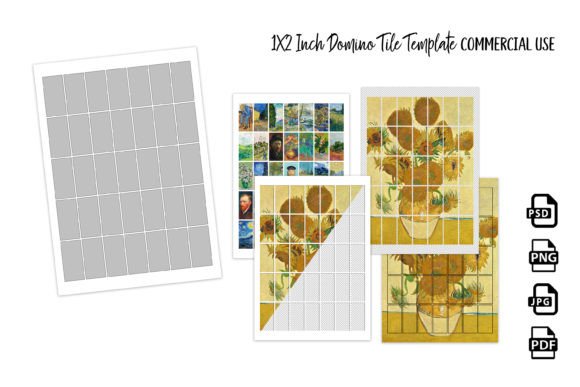
The primary appeal of this set lies in its flexibility. The kit is designed to accommodate various levels of technical expertise and different software preferences. At its core, the package provides the specific 1x2 inch dimensions, a classic size for domino art, but the delivery methods ensure you can use them regardless of your current toolset.
For those who prefer a hands-on approach or are working with physical printing, the Low tech JPG template is invaluable. You can print this directly onto your design paper, giving you a precise outline to cut or trace. This is particularly useful for junk journaling or collage work where you might be adhering paper to cardboard bases.
However, the true power for digital creators lies in the layered files. The PNG Transparent layer for placing designs under the template acts as a digital stencil. You simply place your background texture, vintage paper scan, or digital art underneath this layer, and the mask reveals exactly what will fit the tile. Conversely, the Shape Mask Transparent layer allows for "clipping." In software like Photoshop or Affinity, you can clip your design layer to this mask, instantly confining your artwork to the 1x2 inch boundary without destructive erasing. Finally, the PSD Smart Objects offer the most advanced workflow. By double-clicking the Smart Object layer, you can paste your high-resolution artwork into a separate file, save it, and watch it automatically warp and fit perfectly onto the domino tile with the correct perspective and lighting, saving hours of manual transformation.
Practical Applications Across Creative Industries
While the name suggests a niche product, the utility of the 1X2 Inch Domino Tile Design Templates extends far beyond traditional crafting. In the realm of brand identity and packaging design, these templates can be used to mock up product tags, loyalty cards, or unique business card concepts. Imagine a boutique hotel or a handmade soap company using these tile-shaped designs for their hang-tags; the distinct ratio provides a memorable tactile experience that standard rectangles do not offer.
For content creators and social media graphics, the 1x2 format is excellent for vertical storytelling on platforms like Instagram or Pinterest. You can use the templates to design a series of connected visual stories that, when printed and assembled, form a cohesive mosaic. This tactile element can be photographed and shared digitally, adding depth to your feed.
Furthermore, jewelry makers will find these templates essential for creating "shrines" or pendants. The ability to design the artwork digitally first—ensuring the face or text is perfectly centered—before printing and sealing it into a resin bezel eliminates material waste and frustration. It ensures that the visual hierarchy of your miniature art piece is professional and balanced before you ever mix your resin.
Enhancing Readability and Visual Hierarchy in Miniature
Designing for a small scale like 1x2 inches presents unique challenges regarding readability and modern typography. When working with these templates, it is crucial to select typefaces that maintain legibility at a reduced size. A highly ornate script font might look beautiful on a poster but can become an illegible blob on a domino tile. Instead, consider using a bold sans serif font for headlines or a clean serif font for body text if your design includes longer passages.
The templates help you establish a clear visual hierarchy within a constrained space. By using the PSD Smart Objects, you can experiment with scale. Does the focal point of your design dominate the space, or is it lost? The ability to toggle layers and adjust placement ensures that your design assets are working harmoniously. For mixed media artists, this means you can preview how a vintage photo interacts with a text overlay before committing to glue, ensuring the final piece has the intended emotional impact and professionalism.
Streamlining Your Workflow and Maintaining Consistency
One of the most significant advantages of using a structured template set is the consistency it brings to a series of works. If you are creating a set of 20 dominoes for a junk journal or a wall installation, maintaining uniform margins and center points manually is tedious and prone to error. The 1X2 Inch Domino Tile Design Templates ensure that every single tile has the exact same safe zone and bleed area.
This consistency is vital for brand perception. If you are selling these tiles as art or incorporating them into a product line, customers expect a uniform quality. The templates act as a quality control mechanism, ensuring that your creative font choices and imagery are presented with the same precision on the tenth tile as they were on the first. This reliability builds trust with your audience and speeds up production, allowing you to fulfill orders or complete projects faster.
Technical Requirements and Best Practices
To get the most out of this package, a basic understanding of your software is helpful. You will require a graphics program capable of working with layers for the PNG files, and specifically Adobe Photoshop for the PSD files. Knowledge of how to utilize Smart Objects is recommended for the PSD format, as this is the feature that allows for non-destructive editing and easy swapping of designs.
When preparing your files, pay attention to resolution. Since these tiles are physical objects, work in a minimum of 300 DPI (dots per inch) to ensure that your modern typography and illustrations appear crisp and not pixelated when printed. Whether you are using the templates for web design assets that will eventually be printed, or for direct editorial design in a physical book, high resolution is the key to a premium finish.
Ultimately, these templates are about removing friction from the creative process. They provide the structure so that your imagination can run wild, resulting in unique, stunning pieces that capture the essence of your artistic vision. By integrating these tools into your design workflow, you elevate the standard of your output and reclaim the time needed to focus on what truly matters: the art itself.