Fast-Track Your Craft with Tag Templates & Smudged-Edges
Sometimes, the creative process just needs to be easy. We all love the idea of hand-crafting every single element, but when you are building a cohesive collection for a client or a personal project, efficiency is key. I originally designed this system for myself—a fast way to generate tags that perfectly matched other kit elements without the mess of physical inks. But I quickly realized that other content creators and designers might appreciate the speed as well. If you have ever struggled with digital brushes or felt overwhelmed by complex layering, the Tag Templates & Smudged-Edges Overlay is your shortcut to professional results.
The Anatomy of the Resource
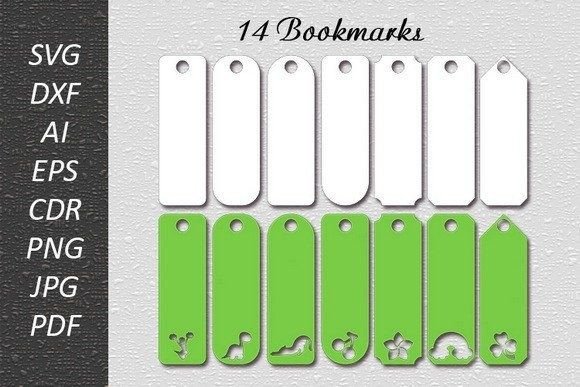
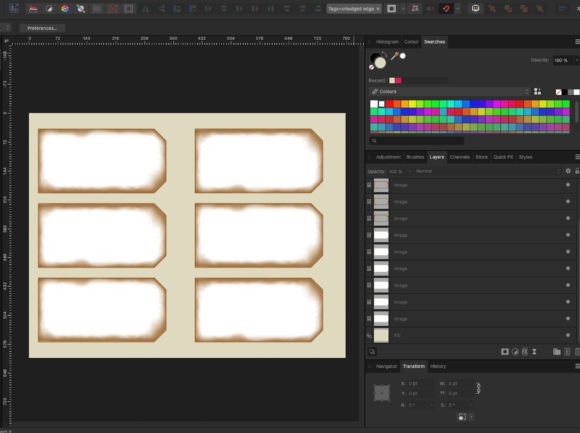
At its core, this is a high-resolution PDF designed to function as a toolkit rather than a static printout. It is not really suitable for printing directly; instead, it is meant to be opened in editing software like Affinity Photo, Photoshop, or Procreate. The package includes a variety of tag shapes and a collection of distressed, smudged edge overlays. The visual style is gritty, tactile, and organic. It mimics the look of vintage paper, ink stains, and natural wear, giving your digital work a tangible, hand-made personality.
The appeal lies in the texture. In a world of flat, vector-based graphic design, these elements add depth. They bridge the gap between digital design and physical reality. Whether you are a scrapper, a marketer, or a brand strategist, adding these distressed elements prevents your layouts from looking too sterile or "computer-generated." It offers a stylistic grit that suggests history and authenticity.
Streamlining Your Workflow
The primary value of the Tag Templates & Smudged-Edges Overlay is speed. The workflow is incredibly straightforward. You open the PDF in your preferred editing software and use the tag images as masks for any image or texture you want to use—PNG or JPG. Once the tag is filled with your chosen image, you simply slide one of the smudged edges over the top. Export it, and your smudged-edge tag is done. No inky fingers, no cleanup, just instant texture.
Could you achieve this effect by messing about with digital brushes for every single tag? Sure. But if you value your time, or if you are new to digital art and don't know how to create realistic distressing from scratch, this is a lifesaver. It allows you to produce a full set of matching elements in minutes rather than hours. You can export a sheet to print for physical junk journaling or use them directly in your digital layouts.
One of the standout features is the flexibility of the overlays. You are not stuck with a single color scheme. You can change the distressed edges with a single click to any color you like, ensuring they match your specific color palette. Furthermore, you can apply blend modes to alter them further, perhaps using "Multiply" to darken the texture or "Screen" to lift it. You can resize the tags as long as you resize the overlay to match, giving you total control over the scale of your project.
Practical Applications for Professionals and Hobbyists
So, where does this resource fit into the wider world of design assets? The applications are surprisingly diverse. For the hobbyist and crafter, these are perfect for scrapbooking, junk journaling, and creating handmade cards. The "smudged" look adds a layer of realism that makes digital journaling feel more authentic.
For graphic designers and entrepreneurs, the utility extends into commercial work. Consider packaging design for artisanal goods; these tags work beautifully for product labels on coffee bags, candles, or boutique clothing. They instantly communicate a "small-batch" or "hand-made" vibe. In editorial design, they can be used as pull-quotes or sidebar elements to break up text and add visual interest. Even in web design, these elements can add a unique touch to "About" pages or product features, setting a brand apart from the clean, corporate look of standard sans serif fonts and rigid grids.
When thinking about brand identity, consistency is crucial. If your brand voice is rustic, vintage, or rebellious, these templates help maintain that visual language across all platforms. They pair exceptionally well with various typography styles. For instance, combining these gritty tags with a clean, modern serif font creates a beautiful high-contrast aesthetic. Alternatively, pairing them with a handwritten font or a script font amplifies the personal, intimate feel of the design.
Maximizing the Impact
To get the most out of the Tag Templates & Smudged-Edges Overlay, think about layering. While the tags work as standalone elements, they really shine when integrated into a larger composition. Use them to anchor text or to frame small illustrations. When testing font pairings, look for typefaces that have enough weight to stand up to the texture of the tag. A delicate, thin premium font might get lost against a heavy smudge, whereas a bold display font will command attention.
Remember that this is a creative tool, not a rigid restriction. Use it to speed up the boring parts of design so you can spend more time on the creative strategy. Whether you are building a social media graphic, designing a logo element, or assembling a digital collage, having a set of ready-made, customizable tags in your toolkit ensures you can move fast without sacrificing style.