Namia Instagram Templates: A Complete Toolkit for Modern Creators
Struggling to maintain a consistent, professional aesthetic on Instagram? You're not alone. Between crafting the perfect caption, shooting compelling content, and actually engaging with your audience, designing every single Story or post from scratch is a drain on time and creative energy. This is where a strategic design asset like the Namia Instagram Templates pack becomes invaluable. It's not just a set of pretty layouts; it's a practical framework designed to streamline your workflow and elevate your visual brand identity without requiring advanced design skills.
More Than Just Layouts: Understanding the Namia Aesthetic
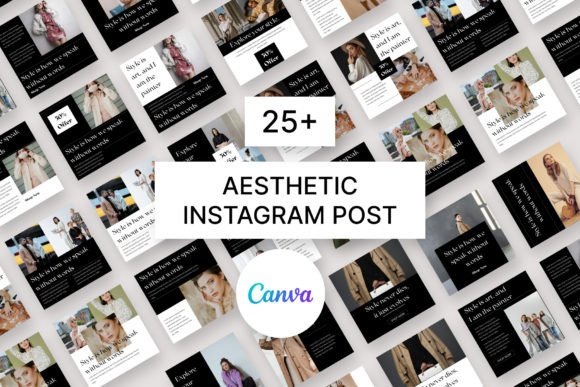
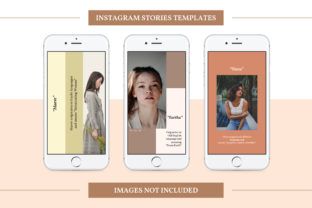
At its core, the Namia pack provides three meticulously crafted Instagram Stories templates in a vertical 1080px by 1920px format. The visual personality of these templates strikes a balance between contemporary clean lines and subtle creative flair. Think of a modern serif font paired with a clean sans-serif for body text, strategic use of whitespace, and layered elements that create depth without clutter. The style leans into a modern typography approach, where the hierarchy between headline, subtext, and imagery is clear and intentional. This makes it ideal for projects that demand both readability and a strong visual hierarchy. The overall appeal is one of polished versatility—equally suited for a minimalist fashion brand as it is for a vibrant lifestyle blog or an e-commerce shop showcasing a new product.
The true power lies in the file structure. Being fully layered and well-organized PSD files means you're not just changing a picture; you're in control. Each design asset—the background, text blocks, shapes, and image placeholders—exists on its own layer. This granular control is what separates a template from a true design tool. You can adjust the color of a single accent line, reposition a text block for better composition, or swap out a shape to match your brand identity precisely. The inclusion of PNG Transparent Files is a thoughtful nod to the diverse toolkit creators use, ensuring seamless integration for Canva users who prefer that platform's interface.
Practical Applications: From Social Feed to Broader Branding
While the name specifies "Instagram," the utility of the Namia templates extends far beyond a single social platform. Consider these real-world applications:
- Social Media Marketing: For marketers and bloggers, these are perfect for creating a cohesive series of Stories announcing a blog post, a sale, or a new service. The fully editable text allows you to tailor the message perfectly, while the consistent style builds recognition across your campaign.
- Brand Consistency for Entrepreneurs: Small business owners can use the templates to establish a professional and recognizable look for their social media graphics. Applying your brand's color palette and fonts (or using the free fonts included to start) ensures every post reinforces your brand identity.
- Editorial and Publishing: Publishers and magazines can leverage the layouts for promoting articles, interviews, or features. The clean structure supports editorial design principles, guiding the viewer's eye from a bold headline to a supporting image and a call-to-action.
- Product Launches and E-commerce: The templates are explicitly designed for product & promotion showcase. An e-commerce shop owner can use them to create a visually engaging Story sequence that highlights product features, uses smart objects for easy image swapping, and directs traffic to a purchase link.
The key is to see these not as a restrictive mold, but as a creative font and layout system you can adapt. The "young activity, trend and lifestyle" ideal mentioned in the features speaks to a dynamic, engaging energy. This could mean using the templates for a fitness influencer's workout tips, a craft blogger's tutorial steps, or a food brand's recipe showcase.
Integrating Namia Into Your Design Workflow
Adopting any new design asset requires a bit of strategic thinking. Here’s how to get the most out of the Namia pack:
- Evaluate Your Project Fit: Before diving in, look at the template previews. Do the layouts align with the kind of content you produce? If your brand is ultra-minimalist, you might simplify the templates further. If it's bold and colorful, the layered structure makes color changes straightforward.
- Master the Smart Object: The instruction to "simply drop your content into the smart object" is the gateway to efficiency. In Adobe Photoshop, a smart object is a container that preserves an image's original data. By placing your photo into this designated layer, you can scale, rotate, and position it non-destructively. This is a fundamental technique for maintaining image quality in logo design, packaging design, and web design mockups.
- Experiment with Font Pairings: The templates likely come with a suggested font pairing. While the free fonts are included, don't be afraid to test your own brand fonts. The well-organized layers make this easy. Good pairing is about contrast and harmony—a classic approach is a serif font for headlines and a sans-serif font for body text.
- Conduct a Readability Check: Always view your final design at actual size on a phone screen. Is the text legible? Does the color contrast meet accessibility standards? The templates provide a strong starting point, but your content length and image choice will affect the final readability.
- Understand the Licensing: The note "IMAGES NOT INCLUDES!" is standard for commercial font and template packs. You are purchasing the right to use the template design and the included fonts in your projects, but you must supply your own photographs or use properly licensed stock images. This is crucial for any commercial use.
Ultimately, the Namia Instagram Templates are a practical solution for creators who value both aesthetics and efficiency. They provide a structured yet flexible foundation, allowing you to focus on what you do best—creating compelling content and building your brand—while the templates handle the heavy lifting of consistent, professional visual design. By understanding their features and applying them thoughtfully, you can transform this pack from a simple download into a cornerstone of your creative business toolkit.